[REVIEW] Yokee, Prove that You are Good at Karaoke!


Yokee - Who love karaoke? Karaoke is one of pleasant entertainment. You can do it alone at home or with friends at the karaoke place. This time it seemed pretty easy to find a karaoke place. You want karaoke for free that you can do everywhere, Yokee is trying to answer that need. More curious with this application? Check out my full review.

Easy and complete
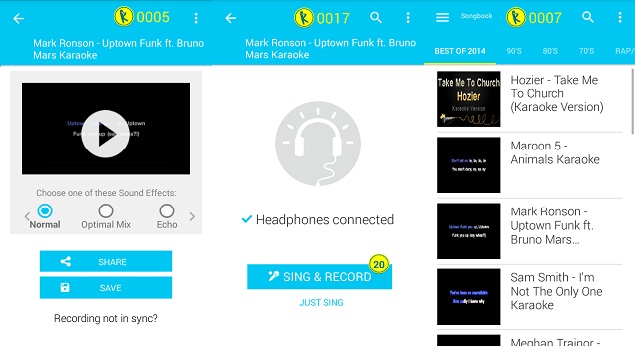
When the application is opened, the user will be prompted to log in with 3 choices IE + Google account sign in, register to be a member and Sign Up Later. There are 4 advantages that can be obtained if you sign in using your Google account + or become a member of Yokee. Start can listen to a song by your friend, share a recording karaoke, synchronize the application with smartphone and get free coins.

Coins are used as means of payment for use the recordings. This means that users who are not logged in will not be able to record the karaoke. There are several alternative ways to get coins like singing a song, completing tasks and being VIP.

Some of the tasks that can be attempted, such as downloading application that offered Yokee, watch ads video, to play Yokee's piano. Yokee itself provides two options of VIP, with weekly and monthly costs USD 2.57 (weekly), and USD 6.53 (monthly). Some of the advantages to be had with the VIP that is ad-free, recording as you wish, VIP, and FX.

Applications with its "sing with your heart" has been integrated with YouTube. This allows to find thousands of songs that can be sung in a catalog of Yokee. The songs are also been grouped into specific categories such as Pop, Love Songs, Popular, Best of 2014, the 90 's, 80 's, 70 's, Rap/Hiphop, which makes it easy to use this application.

What about songs from other genres such as rock and metal? You can use the search feature to find songs as desired. For example, when searching for the song "Animals" from Maroon 5 then the search will appear in a series of similar titles with karaoke video. Tap the screen on one of the songs it wants to begin to karaoke. Later the user will be given 2 options i.e Sing & Record and Just Sing.

Note, when using Yokee, both mere singing or recording, you are required to use the headset.

Record and share

The main features offered by Yokee is record and share. Anyone can record the action as much as any karaoke if has enough coins. It takes 20 coins for all record. The amount is big enough, the user must complete at least some of the songs or a task that must be completed to be able to record a song.

After a song taped 6 users can choose the available sound effects like Normal, Optimal Mix, Echo, Stage, Hall and Funny. Karaoke recordings later can be stored or shared via Google +, Whatsapp, E-mail, SMS, etc. A recording that is saved will automatically enter the menu My Recordings. Open the menu to see a list of recordings of karaoke songs.

To see the friends that use Yokee, you can open the Friends menu. Users are required to sign in with your Facebook account to see a list of friends with their karaoke recordings. Same as in social media, a user could give a thumbs up to the recording of the song.

Another application that also offers a similar feature is Musixmatch. The difference is Musixmatch can play songs stored in smarpthone and there is no category of song. Ready to karaoke?

Read : [REVIEW] Sing! Karaoke, Feels Like Singing in Recording Studio

PLUS
  1. The category search makes it easy to track
  2. Features of Friends to see which Facebook friends are using this application.

MINUS
  1. To record it required 20 coins.
  2. Need a good internet connection.

[Review] Sing! Karaoke, Feels Like Singing in Recording Studio

Review Sing! Karaoke

Sing! Karaoke - Who says karaoke is expensive? With the rapid advancement of technology, it's been quite a lot of applications that we can use to an all-you-can-eat karaoke anywhere and anytime. One of the applications that provide these services is Sing! Karaoke.

Developed by the developer born applications, Smule, Sing! Karaoke is equipped with various effects recordings are cool and not lose the good karaoke place. To be able to use this application, you need a headset and certainly a pretty good internet connection. What the heck is interesting of this application? Here is the complete review.

Playing with effects

Singing at Sing! Karaoke by Smule it's easy. When you have finished downloading the application, you will see at the home was filled with a wide variety of songs from genres such as Pop, R&B, Rock, Hip Hop, Country, Kids, Classics, K-Pop, and various categories such as Unlocked, Recommended, Top Hits, Community, New, Free, Partner Artists, Soundtracks, and VIP-only.

First I tried a song that is in the category of Unlocked and I chose a song called "Rude" sung by the band Canada, MAGIC. Afterwards, simply pressing the green button bearing the Sing. Afterwards you will find a selection of Solos, Duets, and group.


After that, I presented the option turn on a video camera or not and I choose not to show as a video. This is why Sing! Karaoke is very exciting, you can be expressive and narcissistic when singing.

Sing! Karaoke also give various effects studios like Polish, Super Harmony, Pop Star, Double You, to Grunge. You can also set the besar-kecilnya sounds and effects. Each completed song to karaoke, later there will be a sound assessment score for you, and you can also listen to the results.

This application also has a customization menu to change the album cover with a picture or photo from the Gallery of the smartphone. In addition, there are also Private and Public options that give you options when you want to share the results of your karaoke (or not). In my opinion, better to choose public because who knew you could get a comment or even favored by the popular singer.

Duet sensation with popular singer

The flagship feature of Sing! Karaoke that tastes haven't owned by other online karaoke applications namely video showing the singer with a popular song to sing a duet with its users. So, you can really feel being a Duet with the singer of the song that was popular. I have tried to Duet with popular singer Jessie J with the song "Flashlight".

If you want to sing songs that are not in the list of categories Unlocked then takes credit for being able to sing the song. The price paid ranges from USD 3.30 to USD 43.24, and you are free to subscribe weekly, monthly, and yearly.

PLUS
  1. Full music category and searchable
  2. Get free and easy credit by watching ads video
  3. Get free credit by downloading the options application
MINUS
  1. Noise-sensitive, so it requires an atmosphere of silence
  2. Need a good internet connection
  3. The results of the recording could not be saved into the smartphone

4talk: 1 Account for All Gadgets Simultaneously

4talk

4talk Messenger - 4talk is instant messaging service for mobile devices and desktop computers. Send and receive text messages, images, sounds, video messages with easy and free. 4talk using internet connections are available for communication, all messaging 4talk in charge. To register is easy, forget your user name and password. 4talk using only your phone number. 4talk simpler and safer. Unlimited devices per account, so you can use 4talk in all your devices at once – smartphones, tablets, laptops, desktop computers, home and Office. Any entity synchronization message in full, all message history will soon be available on all your devices. 4talk with IM, you will always be available on all your devices. Even when the device is turned off or does not have access to the internet, 4talk IM will save all messages for You on the server and delivered to you as soon as possible. Using push notification system, push notifications enabled, you'll never miss a message from your friends.


4talk works with your phonebook, so you don't need to look for anyone. There is a conference or Group Chat, you can do the Conference indefinitely with your friends. With 4talk you can send the location, building the route, send your contacts and files, smiles and stickers. Using cloud storage systems, 4talk store all files posted on a secure cloud storage. Your files are always available to You on all your devices.

The following is the steps to install 4talk :
  1. Open Play Store App, then search 4talk Messenger and click install.
  2. Once complete, click open to start using Messenger 4talk applications.
  3. Select your country and enter your phone number.
  4. A notification will appear as below, click next to continue.
  5. You will get a verification code via SMS.
  6. Enter your first and last name and then change the profile photo.
  7. Welcome to 4talk
  8. You can invite your friends via Facebook, Twitter and Contact on your mobile phone
  9. Some display of 4talk Messenger.


Download 4talk Messenger

EveryCircuit : Electrical Simulator in Your Hand


EveryCircuit - Every Circuit is an electronic circuit simulators application from MuseMaze that we can use via mobile android. In Every circuit we could run a series or simulate circuits without the need to make rangkain above PCB or early Breadboard.. With the use of this application then manufacture or testing of electronic circuits become more disappear.

The application has several options such as:

  • Workspace : area where we make circuit.
  • Community (or group home from a series that was created by someone else).
  • Bookmark: places save sets that we have made.
  • Examples: contains some basic circuits that have been there
  • Trash

In EveryCircuit we make a series in the area of the workspace. We can make of the component that is already available. By mentouch last relationship component symbols point from one component to another component to connect or jumper both the circuit. We can also change the value of each component and can be directly run it or simulate. After we run we can see the course of the current existing dirangkaian, the input and output waveforms graphically. We can also change the value of the value of the component directly when the way of rangkain and can be viewed directly output. We also uploaded the bias circuit or send a circuit that we make it through some of the sosmed that we have

Some features offer on EveryCircuit as follows:
  1. Oscilloscope
  2. DC and transient simulation
  3. Play/pause button simulation
  4. Save and open the circuit schematic
  5. Animation of the movement of the currents and voltage waves
  6. Animated charging capacitor
  7. Analog control knob for setting a specific component
  8. Cable routing is automatically
Electronic components that are available on this application :
  1. Passive components: resistors, Capacitors, Inductors
  2. Source
  3. Signal of generator
  4. Transformer
  5. Potentiometer
  6. Lights
  7. Switch: SPST, SPDT
  8. Diode, diodazener, lightemittingdioda (LED)
  9. MOS transistor (MOSFET)
  10. Bipolar junction transistor (BJT)
  11. Logic Gates: AND, OR, NOT, NAND, NOR, XOR, XNOR
Circuit examples are available:
  1. Current
  2. Voltage and Ground
  3. Resistance and Ohm
  4. KCL and current divider
  5. KVL and voltage divider
  6. Resistor tree
  7. Two way light switch
  8. Capacitor
  9. RC step response
  10. LC Oscilator , Ring Oscilator
  11. Diode
  12. Half-wave rectifier , Full-wave rectifier
  13. LED current limiting , LED blinker , LED array
  14. Transmission line
  15. Inverter
  16. AND gate driving
  17. Interactive truth table
  18. Inverting amplifier dan Non-inverting amplifier
  19. Instrumentation
  20. Light dimmer
  21. Voltage regulator
  22. Track and hold
  23. Cmos inverter
In the example circuit there is also a description of the circuit.

Download EveryCircuit in Play Store

Examples of the Every Circuit display :


Review: Xiaomi MIUI 7 Global Stable Build


Good news for you Xiaomi smartphone users and also MIUI ROM users. Because Xiaomi finally released a stable version of MIUI 7 globally. The following is a list of the Smartphones that obtain Xiaomi MIUI 7, along with links to download ROMS manually.

Each of the above file has a size of around 800 MB. So make sure you have adequate internet access. There are two methods to get the MIUI 7. The first is to do the updates directly from the smartphone Xiaomi. The second is to download the MIUI ROM 7 manually.

There are two option ROMS that you can download. Fastboot ROM is how do flashing or updates in a way put the ROM file into the internal or external memory of the smartphone. While Recovery ROM when you want to do the flashing or updates by connecting your computer, smartphone and use an additional flashing to do the update.

Some time ago, I've had a chance to review the tutorial of how to do the update using the MIUI ROM Recovery.

Many interesting features, but MIUI greedy at RAM


Currently I'm using Xiaomi Mi 4i and have long used the MIUI 7 beta already present in advance on last August. In terms of appearance, no significant changes from the MIUI 7. But there are some interesting features that become more value from the MIUI 7. But considering I'm using the beta version, as time goes by, it turns out that there are some additional features that appear whenever there is an update.


The first is the MiDrop feature that allows you to send all kinds of files easily to other smartphone users Xiaomi to be around you. In a nutshell, MiDrop is similar to AirDrop belongs to Apple that has long been available on their devices.

The second feature is Disable Button, that will disable the three buttons — Back, Home, Menu — main navigation. This feature is very useful when playing games. Because previously I pretty often press one of these keys while playing the game.

Third is the Lock Apps that allows you to lock specific applications. So when the smartphone you use others, they cannot open the personal applications that you use often.

MIUI ROM open perfectly, there are some drawbacks that I feel. The first is in terms of performance. Especially when connected with a fast internet connection and there are several applications running simultaneously like a Messenger from Facebook, LINE, and browsing with Chrome. Performance of Xiaomi and MIUI 7 suddenly become very slow, so I have to restart this smartphone. Another factor that causes it is a beautiful display of the MIUI 7 that sacrificed much RAM. Of the original 2 GB of RAM, only left 1 GB only.

In addition, 7 still uses Android MIUI 5.1 Lollipop. While for some versions of smartphone Xiaomi some even still use Android 4.4 KitKat. It would be better if Xiaomi could launch the latest ROM complete with the latest version of Android as well.

Shady Wars, a Games for Eminem Fans


Shady Wars - Popular rap from United States, Eminem, now starring in a mobile game titled Shady Wars. The game was developed over his record labels cooperation along with developer Music Powered Games use rap music as part of the core gameplay. More good news again, Shady Wars already can you download right now at the Apple App Store or Google Play Store free of charge.

Shady Wars feels special compared to other mobile games which are both popular celebrities present. The presence of Eminem here not only as a sweetener, but his chant song lyrics quickly actually inserted into the core gameplay is a mix of elements of arcade and game rhythm.


The player controls a character to catch various objects falling from the sky. These objects have various forms, ranging from the words taken from the lyrics to the objects that correspond to the song that is being played. The characters can be directed to moving left and right to catch the objects in each level.

In addition to the capturing object, you will also face another challenge in each level. There is an enemy that you must shoot, the coins can be collected, up to dangerous things you should avoid. These coins are useful for opening up a wide range of new features as well as an additional character in the game.


Although only packaged in a 2D graphics are far from the impression of luxury, fans of Eminem would be so pampered in Shady Wars. Players have the chance to play Eminem along with some artists from his record label through eight original songs from the rap musician who put into this game.

Are you including the rap music genre fans? What do you think of with inroads who do Eminem through Shady Wars?


How to Browsing Without Internet Connection in Your Android

How to Browsing Without Internet Connection in Your Android

Internet browsing on Android smartphone is the usual thing. But how would it be if browsing without using an Internet connection? In the article this time, JalanTikus will discuss how to browse without an internet connection. By browsing without internet connection, internet packet data you certainly more efficient than ever before.

Browsing Without Internet Connection


For browsing without internet, you need a special application called SMSmart. SMSmart is an application that can be used to obtain various information such as News, Maps, Twitter, Wikipedia, and more without using an internet connection.

To get such information, SMSmart use SMS as perantaranya. Don't worry, your pulse will not reduced when using it. For more details, TechWayOut will summarize in the following article:

How to Browse without using an Internet connection on Android

Download SMSmart and install it as usual in your Android.

The look of the interface SMSmart.
With SMSmart, you can use the features like:

Search
News
Maps
Wikipedia
Places
Stocks
Feedback
Twitter

A screenshot of Twitter with SMSmart.
You can send direct tweets here.
Screenshot when the menu Maps.
Screenshot of Search.

Video of SMSmart:


Note!
Because this application is still in BETA, perhaps many menus are still not functioning optimally.

How to Transfer 100 MB File only 4 Seconds on Android with SuperBeam

How to Transfer files of 100 MB only 4 Seconds on Android with the SuperBeam
SuperBeam
Share files via Bluetooth may have been wont to do. If the file size is not a large share of us might share via Bluetooth is not too problematic. However, if his file over 100 MB, transfer via Bluetooth will inevitably take a long time. In the article this time, TechWayOut will discuss how to transfer large files quickly in Android.

Superbeam

As it turns out, other than via Bluetooth there is another way of sharing large files. The trick is to use SuperBeam. With the SuperBeam you can transfer data 10 x faster than Bluetooth. Here are the steps to use SuperBeam data transfer.

How To Use Superbeam For Data Transfer :
  • Download and install the Superbeam application in your Android and your friends Android.
  • Select the files you want to transfer. Then transfer the files via the SuperBeam.
  • It will automatically show up a Barcode of that file.
  • Open the SuperBeam in your friend Andro. Then enter the Scan the Barcode menu and point his camera into the barcode.
  • When the barcode was successfully scanned, the file transfer process will automatically run by itself.
  • If you still can not, you can see the following video:

You can perform a file transfer of any kind of size with the SuperBeam. Don't forget, you can download the software for free or read a lot of other interesting articles at TechWayOut. Good luck!


UC Browser, the second most popular Browser in the world

UC Browser, the second most popular Browser in the world
UC Browser

UC Browser, mobile browser UCWeb, the mainstay of the company Alibaba Group, has gained a new achievement, with number two mobile browsers became most popular in the world by mastering the segment about 16.82% according to StatCounter. This latest accomplishment achieved along with a consistent increase in foreign markets, for example, with more than half the mobile browser categories 51.9% (StatCounter) to September in India and seized about 42.1% (StatCounter) for the same month in Indonesia, the country's second and third biggest population in Asia. India and Indonesia have become the new benchmark for mobile internet, although still largely supported the growth of the internet fairly rapidly.


UC Browser has gained success in emerging economies like China, India, and Indonesia that if together have about 2.8 billion population or nearly a third of the total number of inhabitants in the world. UC Browser is very successful in luring the user gadget to use the Browser as U.C. browser choice.

UC Browser itself has been using unique technology which uses cloud as data storage of up to 60%, the data compression feature makes the process of loading pages faster as well as save quota. At the beginning of this month, UC has released the Browser UCWeb 6.6 for Android to give comfort to its users.